If You're Building an LLM Agent, You're Probably Overpaying by 50%
Every major LLM provider now offers prompt caching. Anthropic, OpenAI, and Google all let you pay a fraction of the cost when the beginning of your prompt matches a previous request. For multi-turn agent conversations, this should mean massive savings.
But here’s the thing: most developers get 0% cache hits without realizing it.
I built CacheGuardian to fix this. It’s a zero-config middleware that wraps any LLM SDK client - Anthropic, OpenAI, or Gemini - and automatically optimizes for prompt caching. No API changes, no manual cache_control markers, no debugging why your cache hit rate is stuck at zero.
To prove it works, I ran 6 experiments with real API calls. Here’s what I found.
The Problem Nobody Talks About
Prompt caching works by storing the processed version of your prompt’s prefix: the system prompt, tool definitions, and earlier messages. When a subsequent request starts with the same prefix, the provider serves those tokens from cache at 90% less cost (Anthropic) or 50% less (OpenAI).
The catch? The prefix must be byte-identical. Not “close enough,” but identical. And five common patterns silently break this:
- Non-deterministic tool ordering. Your framework loads tools from a dict or set. The order changes between requests. Cache miss.
- Dynamic system prompts. You embed
datetime.now()or the user’s name in the system prompt. It changes every turn. Cache miss. - JSON key ordering. Your tool schemas come from a language with unordered maps (Go, Swift). Keys shuffle. Cache miss.
- Missing cache markers. Anthropic requires explicit
cache_controlbreakpoints. Without them, no caching at all. - Using the wrong model. Your prompt is 1,500 tokens but your model requires 4,096 to cache. Zero hits - switching models could save 60%.
The worst part? There’s no error. The API happily processes your request at full price. You only notice when you check your bill.
Experiment 1: The Silent Tax of Tool Ordering
Does shuffling tool order between API calls actually break the cache?
I set up a 10-turn conversation with 5 tools (~1,500 tokens of tool definitions), an 800-character system prompt, and realistic coding assistant messages. Before each turn, I shuffled the tool array with random.sample().
- ARM A (Raw SDK): Shuffled tools sent directly to
client.messages.create(). - ARM B (CacheGuardian): Same shuffled tools, but CacheGuardian auto-sorts them and injects
cache_control.
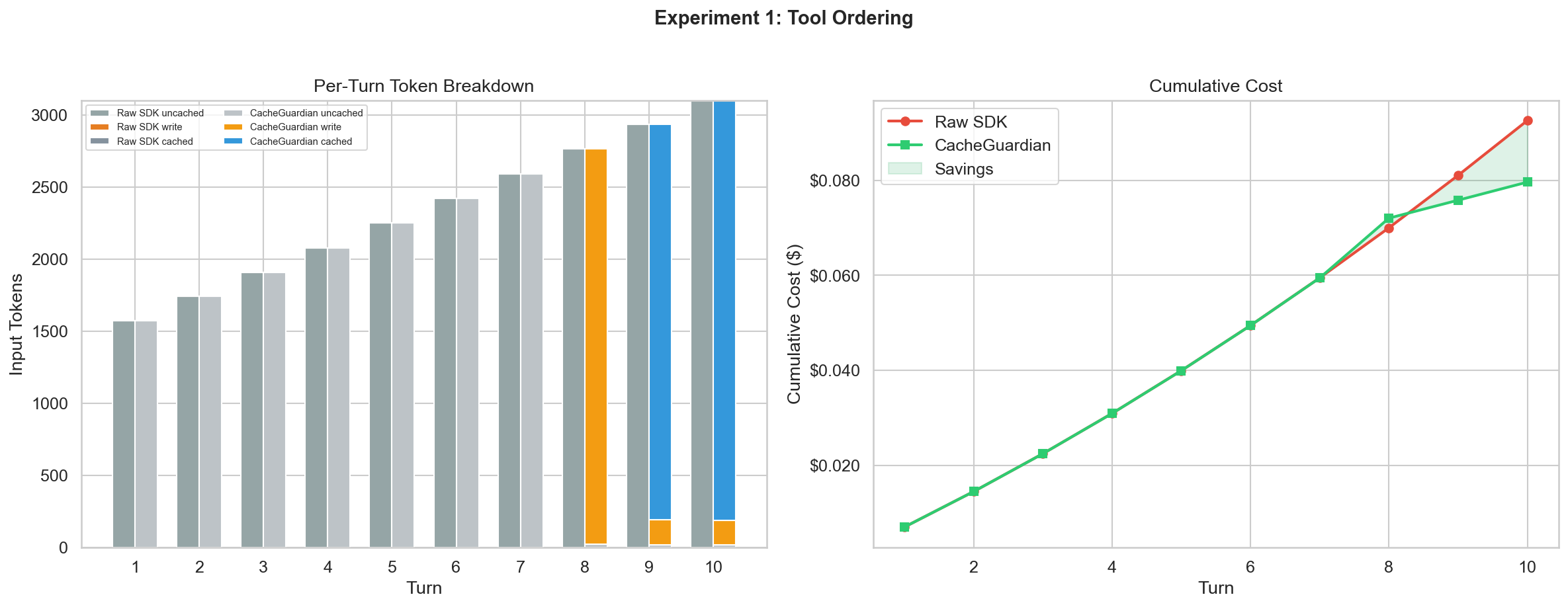
| Raw SDK | CacheGuardian | |
|---|---|---|
| Total cost | $0.093 | $0.073 |
| Peak cache hit rate | 0% | 94.0% |
| Savings | - | $0.020 (21.5%) |
The raw SDK got 0% cache hits across all 10 turns. CacheGuardian achieved 93-94% cache hits once the conversation exceeded the minimum cacheable threshold.
The fix is trivially simple: sorted(tools, key=lambda t: t["name"]). But almost nobody does it. CacheGuardian handles this automatically, along with recursive JSON key stabilization.
# Before: tools in random order every call
client.messages.create(model="...", tools=tools, messages=msgs)

# After: one line, everything is handled
client = cacheguardian.wrap(client)
client.messages.create(model="...", tools=tools, messages=msgs)
Experiment 2: The Timestamp Trap
What happens when you embed dynamic values in your system prompt?
This is the most common anti-pattern. Developers want the model to know the current time:
system = f"You are a helpful assistant. Current time: {datetime.now()}"Every turn, the system prompt is different. Every turn, the entire cache is invalidated.
| Raw SDK | CacheGuardian | |
|---|---|---|
| Total cost | $0.071 | $0.068 |
| Peak cache hit rate | 0% | 91.9% |
| Savings | - | $0.003 (4.1%) |
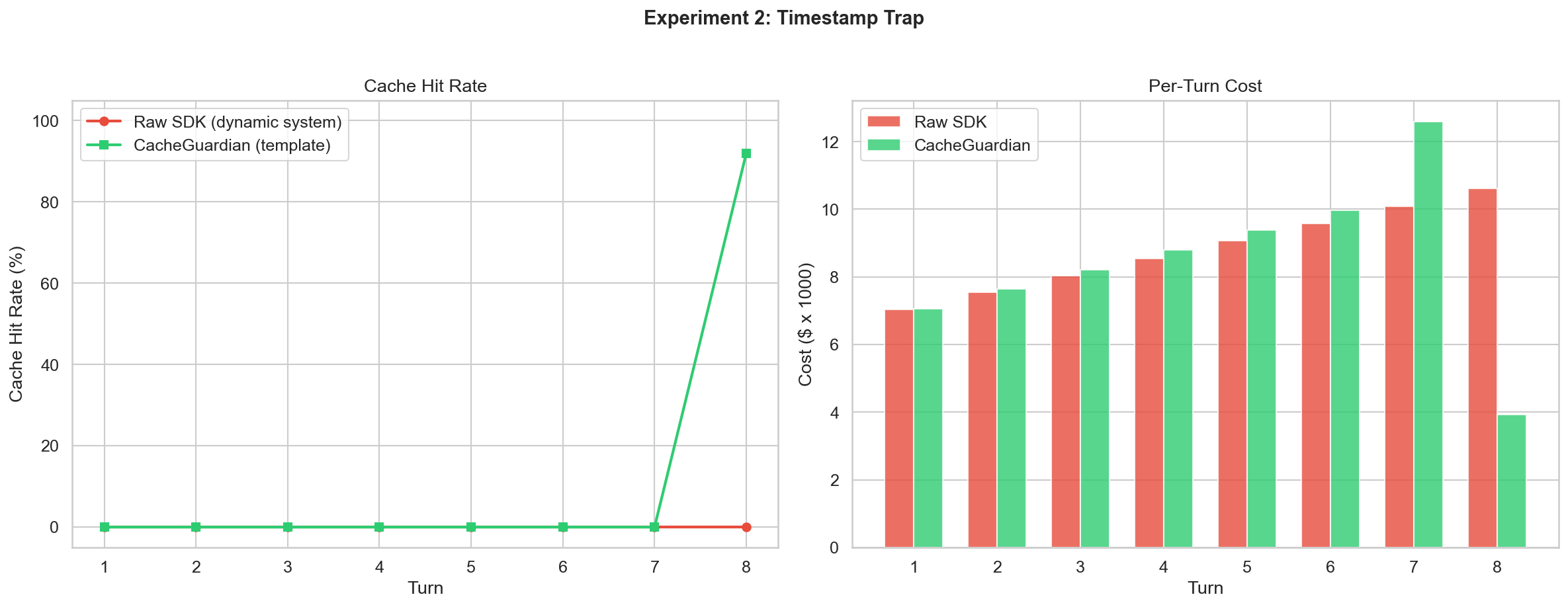
The savings appear modest because the experiment only ran 8 turns. The real cost of the Timestamp Trap is that it poisons every other optimization. Even sorted tools and stable messages can’t save you if the system prompt changes every request.
CacheGuardian’s SystemPromptTemplate keeps the system prompt static and moves dynamic values into the user message:
from cacheguardian.core.optimizer import SystemPromptTemplate

template = SystemPromptTemplate(
    "You are a helpful assistant. Current time: {current_time}."
)
system = template.static_part  # Never changes
reminder = template.render_dynamic(current_time=datetime.now().isoformat())
Experiment 3: Before You Spend a Cent
Can I predict cache behavior without making any API call?
CacheGuardian’s dry_run() mode fingerprints request segments and checks them against stored state. It tells you whether a request would hit the cache, where the divergence point is, and what to fix - all in microseconds, at zero cost.
| Scenario | Result | Details | Latency |
|---|---|---|---|
| Identical prefix | HIT | 100% prefix match | 10.6ms |
| Shuffled tools | HIT | Auto-sorted, no break | 1.6ms |
| New tool added | MISS | Diverged at tools | 1.7ms |
| First message edited | MISS | Diverged at message[0] | 1.2ms |
| Extra messages appended | HIT | 100% prefix match | 1.1ms |
| System prompt changed | MISS | New session | 0.7ms |
| Model changed | MISS | New session | 0.7ms |
Every prediction was correct. Total cost: $0.006 (one baseline call). This is invaluable during development:
result = cacheguardian.dry_run(
    client, model="claude-sonnet-4-6",
    system=system_prompt, tools=tools, messages=conversation,
)
assert result.would_hit_cache, f"Cache broken at: {result.warnings}"
Experiment 4: The Full Picture Over 20 Turns
Over a realistic 20-turn coding agent conversation, how much does CacheGuardian save?
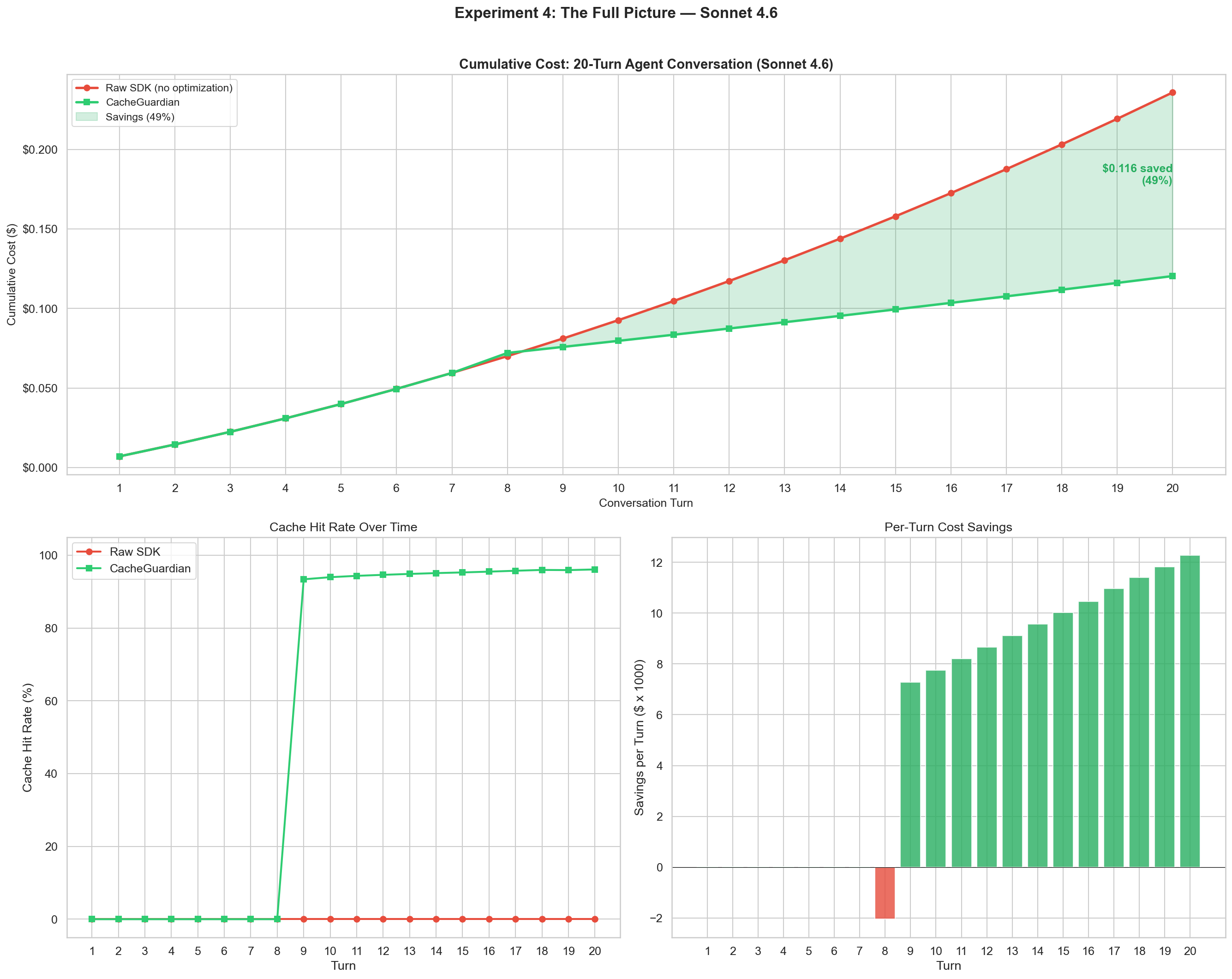
This is the hero experiment. 20 turns of a developer working with a coding agent, tools shuffled every turn.
| Raw SDK | CacheGuardian | |
|---|---|---|
| Total cost (20 turns) | $0.236 | $0.120 |
| Peak cache hit rate | 96.1% | 96.1% |
| Savings | - | $0.116 (49.0%) |
The two cost curves diverge at turn 9 and keep widening. By turn 20, CacheGuardian saves nearly half the cost. The key insight: prompt caching gets more valuable as conversations get longer. A 20-turn conversation has ~10x more cacheable tokens than a 2-turn one. Without optimization, you’re paying full price for all of them.
Experiment 5: When Things Go Wrong
When caching breaks, can CacheGuardian tell you exactly why?
I built up 5 turns of healthy cache, then tested 4 deliberate breaks:
| Break Scenario | Detected? | Divergence Point |
|---|---|---|
| New tool added | Yes | tools - tool added: z_deploy_service |
| Early message edited | Yes | message[0] - content modified |
| Tools removed | Yes | tools - tools removed: list_directory, search_code |
| Tool schema modified | Yes | tools - schema changed: read_file |
4/4 cache breaks detected with precise diagnostics. CacheGuardian tells you what changed, which element, and what to do about it.
Experiment 6: Are You Using the Wrong Model?
NEW in v0.3 - This is the experiment that started it all.
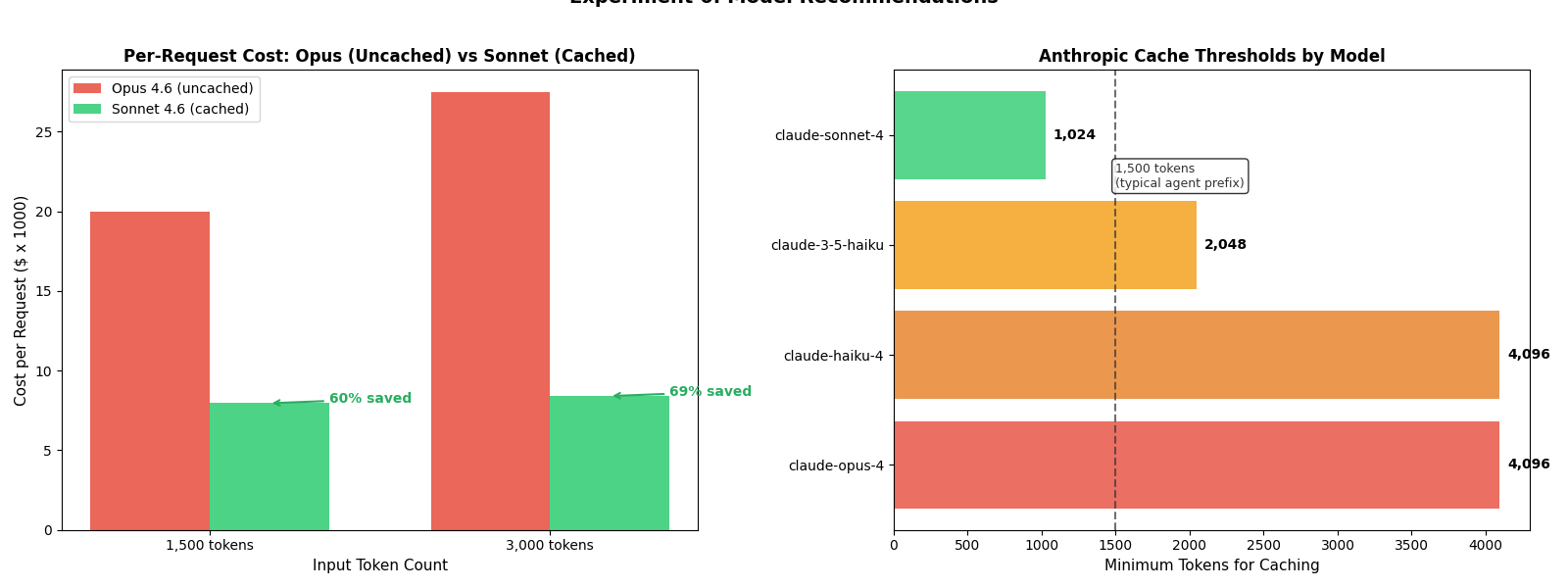
I ran the same benchmark suite on Claude Opus 4.6 - Anthropic’s most capable model. The result? 0% cache hits across all experiments. Not because of tool ordering or timestamps, but because the conversation prefix (~2,200 tokens) never exceeded Opus’s 4,096-token minimum for caching.
A developer sending 1,500 tokens to Opus pays $5.00/MTok input with zero caching. The same prompt on Sonnet (1,024-token minimum) would cache at $0.30/MTok - and with the lower output cost ($15/MTok vs $25/MTok), the total per-request savings come to 60%.
CacheGuardian now detects this automatically:
import cacheguardian

rec = cacheguardian.recommend(
    provider="anthropic",
    model="claude-opus-4-6",
    token_count=1500,
)
print(rec)
# ModelRecommendation(
#   recommended_model='claude-sonnet-4-6',
#   reason='1,500 tokens < claude-opus-4's cache min (4,096)',
#   savings_percentage=60.0,
#   capability_note='claude-sonnet-4 (high-capability) is less capable
#                     than claude-opus-4 (frontier).'
# )
The model advisor evaluates four scenarios:
| Scenario | Model | Tokens | Recommendation | Savings |
|---|---|---|---|---|
| Below threshold | Opus 4.6 | 1,500 | Switch to Sonnet 4.6 | 60% |
| Above threshold | Opus 4.6 | 5,000 | None (caching works) | - |
| No cheaper option | Sonnet 4.6 | 500 | None (nothing caches at 500) | - |
| Near threshold | Opus 4.6 | 3,000 | Switch to Sonnet 4.6 | 69% |
It also includes capability warnings - if you’re dropping from a frontier model to a mid-tier one, CacheGuardian tells you:
claude-sonnet-4 (high-capability) is less capable than claude-opus-4 (frontier).
For a 2+ tier drop (e.g., Opus to Haiku):
claude-haiku-4 has significantly reduced reasoning capability compared to claude-opus-4. Verify task complexity before switching.
The recommendation runs in the background during every request (when log_level is INFO or DEBUG), and is also available via dry_run() and the standalone recommend() API.
Works With Every Major Provider
CacheGuardian v0.3.1 supports Anthropic, OpenAI, and Google Gemini with provider-specific optimizations:
| Provider | Auto-Fix | Cache Mechanism |
|---|---|---|
| Anthropic | Tool sorting, JSON stabilization, cache_control injection | Explicit breakpoints, 1,024-4,096 token min |
| OpenAI | Tool sorting, system reordering, bucket padding | Automatic prefix matching, 1,024 token min |
| Gemini | Kwargs normalization, content promotion | Context caching, 1,024 token min (32K+ for explicit) |
import cacheguardian

# Same API for all providers
client = cacheguardian.wrap(anthropic.Anthropic())
client = cacheguardian.wrap(openai.OpenAI())
client = cacheguardian.wrap(genai.Client())
All 244 tests pass across 3 providers, including 45 live integration tests with real API calls.
How It Works Under the Hood
CacheGuardian uses a three-layer architecture:
L1: In-Process Fingerprint Cache (<1ms) - Every request is broken into segments (system prompt, tools, each message) and hashed independently. The combined fingerprint detects the exact point of divergence without re-hashing the entire prompt. The Model Advisor runs alongside L1 to check cache economics.
L2: Distributed Prefix Cache (Optional, Redis) - Shares prefix hashes across workers in multi-process deployments.
L3: Provider API - After auto-fix transforms (tool sorting, JSON stabilization, cache_control injection), the request goes to the provider. CacheGuardian extracts cache metrics from the response and updates session state.
Get Started in 60 Seconds
pip install cacheguardian[anthropic] # or [openai], [gemini], [all]import cacheguardian
import anthropic
# One line. That's it.
client = cacheguardian.wrap(anthropic.Anthropic())
# Use the client exactly as before
response = client.messages.create(
model="claude-sonnet-4-6",
system="You are a helpful assistant.",
tools=my_tools,
messages=conversation,
max_tokens=1024,
)# Check if you're on the right model
rec = cacheguardian.recommend(provider="anthropic", model="claude-opus-4-6", token_count=1500)
# Pre-flight cache validation
result = cacheguardian.dry_run(client, model="claude-sonnet-4-6", messages=msgs)More features: SystemPromptTemplate, strict_mode=True, privacy_mode=True, Redis L2 backend.
Methodology
All cache optimization experiments used real Anthropic API calls with Claude Sonnet 4.6. Model recommendation experiments (Experiment 6) use CacheGuardian’s local recommend() API with no API calls.
The benchmark ran 6 experiments totaling ~82 real API calls plus dry-run and recommendation predictions at zero cost. Cold-start cache warming (turns 1-7 showing 0% cache hits) is expected behavior.
The complete experiment code is available as a reproducible Jupyter notebook: cacheguardian_benchmarks.ipynb.
Total API cost for all experiments: ~$0.70.
CacheGuardian is open source and MIT licensed. 244 tests across 3 providers. If you’re building LLM agents and want to stop overpaying, check it out on GitHub.